

Stop when you’re done#
Write a kernel that knows when its own sample has finished, then run one trajectory on the CPU and a batch on the GPU with the same call.
Time: ~8 min · Runs on: CPU, GPU switch · You need: Arguments and shapes
A stepping kernel advances one sample by one step and declares a
Terminated plane — a per-sample “done” flag. A sample already flagged
terminated going into a step keeps its outputs exactly where they
landed, so a batch of samples that finish at different times never
corrupts the ones still running.
import hawk
from hawk import Mutable, Param, Scalar, Terminated


@hawk.kernel
def oscillator(omega: Scalar, t_end: Scalar, dt: Param, terminated: Terminated,
               x: Mutable[Scalar], v: Mutable[Scalar], t: Mutable[Scalar]):
    x, v = x + dt * v, v - dt * omega * omega * x   # tuple: reads step-start x, v
    t = t + dt
    terminated = t >= t_end


oscillator
<Kernel oscillator slots=9>
Tuple vs two lines#
Reading x, v or t before writing them gives the value each held at
the start of this step. x, v = x + dt*v, v - dt*omega*omega*x
above is a tuple assignment: both expressions on the right read the
OLD x and v — the explicit Euler method. Two separate lines,
x = x + dt*v then v = v - dt*omega*omega*x, let the second line read
the NEW x the first just wrote — the symplectic (semi-implicit) Euler
method, which conserves an oscillator’s energy far better over many
steps:
@hawk.kernel
def oscillator_sequential(omega: Scalar, t_end: Scalar, dt: Param,
                           terminated: Terminated, x: Mutable[Scalar],
                           v: Mutable[Scalar], t: Mutable[Scalar]):
    x = x + dt * v                        # old v
    v = v - dt * omega * omega * x        # NEW x, just written above
    t = t + dt
    terminated = t >= t_end
import eagle

energy = lambda r, omega: 0.5 * (float(r.v) ** 2 + omega ** 2 * float(r.x) ** 2)
for name, kernel in [("tuple (explicit Euler)", oscillator),
                      ("two lines (symplectic Euler)", oscillator_sequential)]:
    r = eagle.simulate(kernel, x=1.0, v=0.0, t=0.0, omega=2.0, t_end=20.0,
                        dt=1e-2, max_steps=100_000)
    msg = f"{name}: energy at t={float(r.t):.0f} is {energy(r, 2.0):.3f}"
    print(msg, "(started at 2.000)")
tuple (explicit Euler): energy at t=20 is 4.450 (started at 2.000)
two lines (symplectic Euler): energy at t=20 is 1.980 (started at 2.000)
Same arithmetic, same effort to type; which integrator you get depends
only on whether the comma is there. (eagle.simulate itself is
introduced properly next — this cell only needed it to run the two
kernels forward.)
One trajectory, by name#
eagle.simulate(model, max_steps=..., **kwargs) takes the kernel and
every plane it reads or writes, by name — no separate state=/params=
grouping, and no terminated to pass, since the kernel itself sets that
— and runs it until every sample finishes or max_steps is reached: the
loop above never appears in your code. Plain floats in means one
trajectory, on the CPU:
one = eagle.simulate(oscillator, x=1.0, v=0.0, t=0.0, omega=2.0, t_end=1.0,
                     dt=1e-3, max_steps=10_000)
print(one.status, "t:", float(one.t), "x:", float(one.x), "v:", float(one.v))
finished t: 1.0000000000000007 x: -0.41697753175791447 v: -1.8222378995667639
(one.steps would print 1024, not 1000: eagle.simulate launches in
fixed-size batches, so the launch count can run a little past what the
physics actually needed once every sample has landed. t is the number
that answers “did it reach t_end”.)
The same call, a whole batch#
Hand it xp arrays instead of floats — one value per sample — and it runs
the identical kernel over every one of them, on the device the arrays live
on. This notebook runs a GPU batch when one is visible, and a smaller CPU
batch otherwise (every tutorial here runs on CPU).
import numpy as np

n = batch_size(gpu=1_000_000, cpu=100_000)   # same kernel either way
rng = np.random.default_rng(1)
omega_b = rng.uniform(1.0, 3.0, n)
omega_b[0] = 2.0   # sample 0 matches the single trajectory above

batch = eagle.simulate(oscillator, x=xp.ones(n), v=xp.zeros(n), t=xp.zeros(n),
                       omega=xp.asarray(omega_b), t_end=xp.full(n, 1.0), dt=1e-3,
                       max_steps=10_000)
print(f"{n} samples on {DEVICE}: finished={int(batch.finished.sum())}/{batch.n}, "
     f"wall_s={batch.wall_s:.3f}")
print("trajectory 0 agrees with the single run above:",
      abs(float(batch.x[0]) - float(one.x)) < 1e-6)
100000 samples on cpu: finished=100000/100000, wall_s=0.024
trajectory 0 agrees with the single run above: True
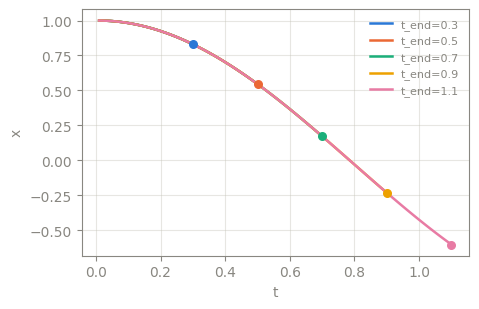
Five samples, five stopping times#
Each sample’s t_end is its own value, so five samples started together
stop on five different steps. Calling eagle.simulate with a growing
max_steps and recording the state each time traces out every sample’s
x(t) up to where it lands — a cheap way to see the trajectory, not how
you would do this at scale (a single max_steps call, as above, is the
right one for that).
What just happened#
Terminated, plus reading aMutablebefore writing it, declare a kernel that advances its own sample and knows when that sample is done; a finished sample’s outputs stay frozen at the value they landed on.Tuple assignment reads every old value on one line (explicit Euler); two sequential lines let a later one read an earlier line’s new value (symplectic Euler) — same cost, different integrator.
eagle.simulate(kernel, max_steps=..., **kwargs)loops the kernel until every sample finishes, for one sample (plain floats) or a whole batch (xparrays) with the exact same call — every plane the kernel reads or writes, passed by name, with noterminatedto supply.
Try this#
Lower max_steps in the batch cell to something smaller than the loop
needs (say 200) and check batch.status — it reports "max_steps"
instead of "finished".
Next#
Gradients, backward — get d(output)/d(input) for every sample of a kernel like this one.