

What a graph is#
One launch replays a whole run; the host reads nothing until it’s done. That is the whole reason eagle captures a graph instead of looping.
Time: ~2 min · Runs on: CPU (GPU: this notebook picks it up automatically) · You need: Thirty seconds: eagle.simulate
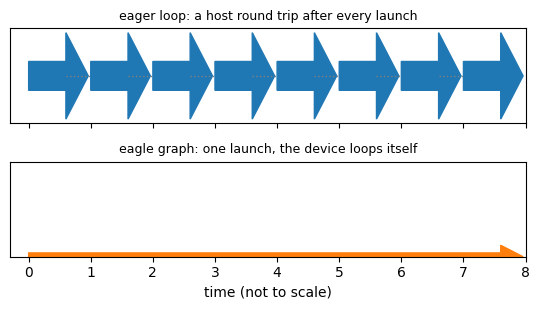
You will build the figure below: a schematic of the two ways to run many steps — reading the device after every one, or recording the sequence once and replaying it.
Why this matters#
A GPU kernel launch is cheap, but a host round trip — launch, then read a device value back before deciding what to launch next — is not: the host and the device have to synchronize. A loop that reads “is anyone still running?” after every step pays that cost every step. A CUDA graph records a sequence of launches once, and the recorded graph can then repeat itself on the device, with a stop condition baked in — no round trip until the whole thing is done.
Arm |
What it does |
Wall time |
|---|---|---|
|
one launch per step, host reads the finished count after every one |
774 ms |
|
the same step, captured once into a graph with its own stop condition |
625 ms |
The code#
eagle.deploy() builds the same kernel from Thirty seconds: eagle.simulate
into a plan; eagle.until_done() binds it and builds the loop — on the
GPU, one GraphPipeline capturing the whole run; on the CPU,
the identical loop runs directly (eagle.repeat_while: “a host loop
everywhere else”). Either way runner.run() is the one call that crosses
into the device or the host team and does not return until every sample is
done (or max_steps).
DEVICE = "gpu" if gpu_available() else "cpu"
xp = xp_for(DEVICE)
import eagle
import hawk
from hawk import Mutable, Param, Scalar, Terminated


@hawk.kernel
def oscillator(omega: Scalar, t_end: Param, dt: Param, terminated: Terminated,
               x: Mutable[Scalar], v: Mutable[Scalar], t: Mutable[Scalar]):
    x0, v0 = x, v
    x = x0 + dt * v0
    v = v0 - dt * omega * omega * x0
    t += dt
    terminated = t >= t_end


n = 1_000_000 if DEVICE == "gpu" else 100_000
omega = xp.linspace(1.0, 3.0, n)
runner = eagle.until_done(eagle.deploy(oscillator), max_steps=10_000,
                          x=xp.ones(n), v=xp.zeros(n), t=xp.zeros(n),
                          omega=omega, t_end=1.0, dt=1e-3)
report = runner.run()
print(f"one runner.run() call -- build (capture) took {report.build_s * 1e3:.2f} ms, "
      f"the kernel fired {report.launches} times while it ran")
one runner.run() call -- build (capture) took 2.26 ms, the kernel fired 17 times while it ran
What just happened#
runner.run()crossed into the device (or the host team) once; on the GPU,build_sis the one-time cost of recording the graph — every laterrun()on the same runner replays it withbuild_s == 0.report.launchescounts how many times the kernel actually fired while the loop ran — that work happens inside the one captured graph (or the one host loop), not as separate round trips from Python.The same two lines (
eagle.deploy+eagle.until_done) build a CUDA graph on the GPU and a plain loop on the CPU; nothing in the call changes.
Try this#
Call runner.run() a second time without runner.reset() first: it
returns immediately (launches == 0) because every sample is already
done.
Next#
Below: the graph engine’s low-level door directly — the same
GraphPipeline/Launcherclasseseagle.until_done()builds on, recording raw launches by hand (needs a CUDA GPU).Performance (deeper): the eager-loop-vs-graph numbers above come from its card, on both a GPU and a CPU.
The low-level door: capturing a raw launch yourself#
Needs a CUDA GPU. GraphPipeline is the Python
face of eagle’s graph engine: it drives the same eagle::cuda C++ classes
(Stream, StreamCapturer, Graph, Launcher) every native consumer
uses. Record a sequence of launches once, then replay the instantiated
graph as many times as you like with no further Python-side dispatch.
Load the compiled kernel: LoadedVector wraps one already-compiled PTX
artifact (gravity.ptx, a two-body point-mass acceleration) with its own
sidecar metadata, with no hawk source and no recompilation.
import pathlib

import cupy as cp
import numpy as np

from eagle.loaded import LoadedVector
from eagle.pipeline import GraphPipeline

FIXTURES = pathlib.Path("../_fixtures").resolve()
force = LoadedVector(FIXTURES / "gravity.ptx")
Allocate the buffers the launch will read and write. Nothing inside a
captured step may allocate device memory or synchronize, so position,
out and terminated are all pre-allocated here, before any capture
begins.
MU = 3.986004418e5
N = 1024
rng = np.random.default_rng(2)
position = cp.asarray(rng.uniform(7.0e3, 4.2e4, size=(3, N)))
out = cp.zeros((3, N), dtype=cp.float64)
terminated = cp.zeros(N, dtype=cp.bool_)
Build the pipeline: add takes a zero-argument callable issuing exactly one
launch. Nothing inside a step may allocate device memory or synchronize —
out, position and terminated are all pre-allocated above. build()
captures the steps into a graph once and instantiates it.
pipe = GraphPipeline()
pipe.add(lambda: force.launch(out=out, position=position, mu=MU, terminated=terminated))
pipe.build()
<eagle.pipeline.GraphPipeline at 0x7f5736f67b30>
gravity’s sidecar declares accumulate: true, so each replay adds
into out rather than overwriting it — replaying the graph k times
accumulates k times the single-launch answer, which is a sharp way to
check that a replay is really re-issuing the captured launch and not a
no-op.
replays = 5
out.fill(0.0)
pipe.launch(n=replays)
cp.cuda.runtime.deviceSynchronize()

r = cp.linalg.norm(position, axis=0)
expected_once = -MU * position / r**3
diff = cp.abs(out - replays * expected_once)
rel_err = cp.max(diff / cp.abs(replays * expected_once))
print(f"{replays} replays vs {replays}x the single-launch answer: "
      f"max rel err = {float(rel_err):.3e}")
5 replays vs 5x the single-launch answer: max rel err = 1.024e-15
See also: Interoperability for feeding cupy/torch tensors through the
same launchers, and eagle.compose.GraphComposer (API reference) for
overlapping several independent pipelines on their own streams.