

Note
Running this on Colab or a fresh environment? Install the family from PyPI,
following eagle’s
install guide.
The NVIDIA packages come only through the [cuda12] / [cuda13] extras:
# !pip install "raptor-hawk[cuda12]" "raptor-eagle[cuda12]" matplotlib
Thirty seconds: eagle.simulate#
Write one sample’s step, hand it to
eagle.simulate, and it runs every sample until it’s done — on the CPU or the GPU, no loop of your own.
Time: < 1 min · Runs on: CPU (GPU: this notebook picks it up automatically) · You need: nothing — the kernel is given below.
You will build the figure at the bottom of this page: where each oscillator in the batch ends up, as a function of its own frequency.
The code#
Write the step as a hawk kernel: a
Mutable plane is what it updates, a Param is one number shared by every
sample, a Scalar one number per sample, and the line terminated = ...
says when a sample is done. eagle.simulate takes the kernel, then its
arguments exactly as you would call it – an array gives each sample its
own value, a plain number is shared by every sample – and runs every
sample until it finishes (or max_steps is reached).
DEVICE = "gpu" if gpu_available() else "cpu"
xp = xp_for(DEVICE)
print("running on", DEVICE)
running on cpu
import eagle
import hawk
from hawk import Mutable, Param, Scalar, Terminated


@hawk.kernel
def oscillator(omega: Scalar, t_end: Param, dt: Param, terminated: Terminated,
               x: Mutable[Scalar], v: Mutable[Scalar], t: Mutable[Scalar]):
    x0, v0 = x, v
    x = x0 + dt * v0
    v = v0 - dt * omega * omega * x0
    t += dt
    terminated = t >= t_end


n = 1_000_000 if DEVICE == "gpu" else 100_000  # CPU: a smaller batch, same call
omega = xp.linspace(1.0, 3.0, n)
result = eagle.simulate(
    oscillator,
    omega=omega, t_end=1.0, dt=1e-3,
    x=xp.ones(n), v=xp.zeros(n), t=xp.zeros(n),
    max_steps=10_000,
)
print(result.status, result.steps, "launches:", result.report.launches)
finished 1024 launches: 16
What it printed#
"finished" and the step count the batch took; every sample here shares the
same stop time (t_end), so they all take exactly the same number of steps.
result.x is the very array passed in, updated in place.
import matplotlib.pyplot as plt

omega_host, x_host = to_numpy(omega), to_numpy(result.x)

fig, ax = plt.subplots(figsize=(5, 3.2))
sc = ax.scatter(omega_host, x_host, s=3, c=omega_host, cmap="viridis")
ax.set_xlabel(r"$\omega$ (per sample)")
ax.set_ylabel(r"$x(t_\mathrm{end})$")
ax.set_title(f"{n:,} oscillators, one eagle.simulate call")
fig.colorbar(sc, ax=ax, label=r"$\omega$")
fig.tight_layout()
plt.show()
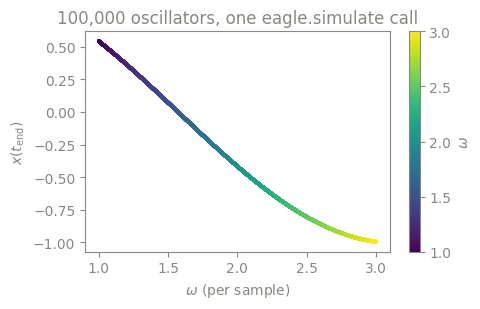
What just happened#
eagle.simulateran every sample’s kernel until its ownterminatedfired, and wrote the final state back into the arrays you gave it.The data decided where it ran: numpy arrays run on the CPU through eagle’s OpenMP team; cupy arrays run the exact same call on the GPU.
result.reportcounts what the call did underneath (launches,steps) — one call, no loop you had to write.
Try this#
Change dt to 1e-4 and re-run: result.steps grows tenfold, the kernel
is unchanged.
Next#
What a graph is — see what one launch replaying many times buys you, and why that kills launch overhead.
How to load a kernel someone else compiled (how-to) — load a kernel someone else compiled instead of writing one, and call it directly.
deeper: Performance — the full measurement behind “one call, no loop”, on both a GPU and a CPU.