

One array, two machines#
Own an array, fill it, and move it to a GPU and back – with the same two lines of code whether a GPU is there or not.
Time: ~6 min · Runs on: CPU, GPU switch · You need: a C++23 compiler (no CUDA toolchain required)
running on: cpu
(Code cells here run through run_cpp(), a tiny compile-and-run helper defined once in _shared/cpp_harness.py.)
aether::Array<T, Es...> owns a batch of samples – Es... is the
per-sample shape, so Array<double, 3> holds n three-component
vectors, one allocation for the whole batch:
print(run_cpp(r"""
    aether::Array<double, 3> arr(6);      // 6 samples, 3 components each
    std::printf("samples=%zu size=%zu\n", arr.samples(), arr.size());
"""))
samples=6 size=18
size() is samples() * 3, the total scalar count.
.hostView() hands back a View, indexed (component, sample), to
read and write each value:
print(run_cpp(r"""
    aether::Array<double, 3> arr(6);
    auto v = arr.hostView();
    for (std::size_t i = 0; i < arr.samples(); ++i)
        for (std::size_t c = 0; c < 3; ++c)
            v(c, i) = static_cast<double>(c * 10 + i);
    std::printf("v(1,2)=%g\n", v(1, 2));
"""))
v(1,2)=12
v(1, 2) reads component 1 of sample 2 – the value highlighted
below.
What you will build (the picture)#
View’s layout is structure-of-arrays: component c’s samples sit in
one contiguous block, not interleaved sample-by-sample. The picture
below shows that for the array above, with v(1, 2) highlighted:
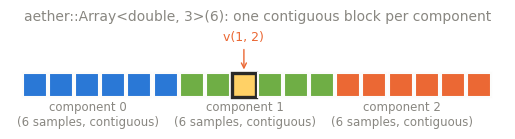
Three blocks of six values each – one per component – is what lets a GPU read one component across many threads in a single coalesced transaction (see Host vs device code).
On a CUDA build, an Array owns two buffers: a host copy and a device
copy.
.upload()/.download() move bytes between them. In a CPU-only build
there is only one buffer, so the same two calls are harmless no-ops:
print(run_cpp(r"""
    aether::Array<double, 1> a(1);
    a.hostView()(0, 0) = 42.0;
    a.upload();     // CPU-only build: no device copy, so this is a no-op
    a.download();   // the same call either way
    std::printf("still here: %g\n", a.hostView()(0, 0));
"""))
still here: 42
The value survives unchanged – on a CUDA build the exact same two lines move it to the GPU and back.
What just happened#
aether::Array<T, Es...>owns its memory;.hostView()indexes it(component, sample).The layout is structure-of-arrays: every component’s samples are one contiguous block.
.upload()/.download()move bytes to and from the device; in a CPU-only build they are no-ops, so the exact same source line is what a CUDA build also runs.
Try this#
Change Array<double, 3> to Array<double, 4> and re-run the first
cell: size() grows to 4 * 6.
Next#
Expressions without temporaries –
compose several operators and watch them still cost exactly one pass
over the data. Deeper: Views and items,
Memory ownership for the full Chunk/View
picture this tutorial only sampled.
Going deeper (optional): proving the layout from scratch#
The SoA layout above is checkable directly, using the lower-level
Chunk/View pair Array wraps: Chunk::allocate takes a Device
(kDLCPU here, the DLPack tag for “on the host”) and a byte count;
make_view<T, C, N> wraps it as a view with C compile-time components
and N samples (aether::dyn marks a dimension as runtime-sized, the
same way Array’s own sample count is):
print(run_cpp(r"""
    constexpr std::size_t C = 3, N = 6;
    auto chunk = aether::Chunk::allocate(aether::Device(kDLCPU), C * N * sizeof(double));
    auto v = aether::make_view<double, C, aether::dyn>(chunk, N);

    bool soa_holds = true;
    for (std::size_t c = 0; c < C; ++c)
        for (std::size_t i = 0; i < N; ++i)
            soa_holds &= (&v(c, i) - v.data()) == static_cast<std::ptrdiff_t>(c * N + i);

    std::printf("SoA identity holds for every (c,i): %s\n", soa_holds ? "true" : "false");
"""))
SoA identity holds for every (c,i): true